|
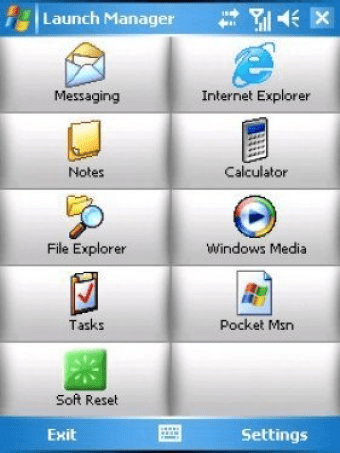
Stop wasting time trying to find an aplication to launch, or endlessly struggling with your contact list.
Launch Manager its a great way to create shortcuts which enable you to launch applications, find contacts or take a picture in a simple, fast and easy way. Its easy to set up, and simple to use.
|
|
TaskSwitchXP 2.0.11 is an advanced task switcher for Windows XP or 2003 ONLY. It has basically the same functions that the Alt-Tab keystrokes have in Windows, with some additional features.
You can customize the appearence of the program for each user, with different colors and fonts.
|
|
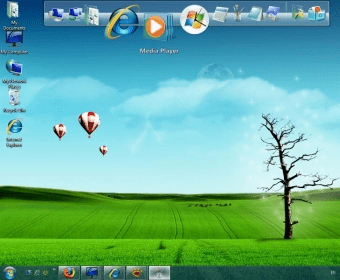
ObjectDock is a task manager that allows you to organize the shortcuts on your desktop. You can launch your favorite programs and currently used applications. It also offers you many features such as a calendar, web search widget and a click. Object Dock allows you to fully customize the dock, its position and many options and effects.
|
|
HP ProtectTools Security Manager 2.0, this real time protection center takes care of unwanted access to your system as well handles innumerable tasks.This multi-functional tool is exclusively designed to configure your Notebook or Desktop for functioning more smartly.
|
|
Vista Start Menu is the convenient alternative to the plain Start menu you find in Windows XP and Windows Vista. The program uses your cognitive abilities (visual memory, reflexes,etc.); however, while it is easily understandable for beginners, it is also highly efficient for experienced users. Learn more >>
Go ahead and try replacing your Start menu right now! It is safe because Vista Start Menu
|
|
AnVir Task Manager is an advanced program for Windows. It has been designed to help us monitor and manage all the processes running in our computer. It has never been so easy to detect suspected items, enable, disable, remove, or put them in quarantine. We are also allowed to view the security risk for each running process, CPU usage and more.
|
|
With Quick Launch Buttons you too can facilitate instant launching of your regularly used programs just at your fingertips. The wizard tool allows you to easily assign quick launching of any program by the touch of a button or by selecting from the list.
|
|
Quickfind is a software designed for fastest file and application access.You just type a word or phrase related to the file name or application name and
Quickfind shows all the related files to that name or word.Just double click the desired file and Quickfind will launch it immediately.Quickfind also enables
the user to open web addresses added to the favorites .
|
|
MultiSet has been created to free you from routine work such as program installations. All
you have to do is to install the application only once on your PC and MultiSet will record
all your actions.
|
|
SUMo stands for Software Update Monitor. It is a very powerful software through which you can update your system using latest version of much desired software. It displays small window screen in the corner of your system for updating when you open a new program. Therefore, it keeps your PC up-to-date.
|
|
With this feature rich program you will be able to switch from one application to another in a fast and fancy way. You can set it up to flip your windows in any direction while switching. You can also configure advanced options related to graphic performance, general behavior, start up, and more.
|
|
Launchy is an application launcher for Windows and Linux. The whole purpose of having an application launcher is that you forget about running applications from the Start Menu. And it makes sense. I use a similar application on Mac OS X, Quicksilver, that is great.
|
|
ObjectDock Plus is the enhanced version of ObjectDock with more attractive features.
This amazing application launches an animated dock on your desktop which allows you to quickly and easily launch applications. The plus version is enhanced with features that allow to explore and launch programs, documents, mail, music, and other in a simple, smart, and configurable way on your desktop.
|
|
System Explorer is a complete system care tool that can give you the details of all the tasks, processes, modules, Windows startup items, IE add-ons, system add-ons, services, drivers, opened files and installed programs in your operating system. Multilingual support and a very compact size make it a must-have system utility.
|
|
Jing is a screen-capture application for Windows platforms. The application allows you to snap screenshots of your screen at any given time. Windows already comes with a capture utility, and newer versions of Windows come with the Snipping Tool, which is great. But many features are not as good as you'd want them to be.
|
|
Windows startup, schedule and task manager that accelerates Windows startup, ensures that the operating system is more stable and allows you to run various tasks with the possibility to specify the launch condition. Full support for the Windows x64.
|
|
AnVir Task Manager Free is a free utility program for Windows. It has been designed to help us monitor, manage, and optimize our computer's overall performance and security. It features a user-friendly interface, which provides comprehensive information on our network traffic, CPU usage, and Memory usage, items on Windows startup, opened applications, running processes, services, and log report.
|
|
DeskSpace is an amazing program that will simulate a nice cube visual effect in your desktop, and will give you the possibility to work among many desktops, where you will be able to change from one to another in a 3D visual way, just pressing hotkeys or with your mouse, and even you will be able to drag and drop windows from one side to another.
|
|
The Ultimate Troubleshooter is a help application for Windows. The application's developers claim that 95% of the problems your computer can present are caused by spyware and processes that are not supposed to be running and actually are. For example, they say that if you can't connect to a wireless network outside of home, it must probably be spyware.
|
|
With this program combine any application shortcuts by groups saving space on a computers desktop. Make your own start menu aside from the original one, with only shortcuts to programs and folders you normally have on your Desktop or access it via the start menu. Create your own skins to personalize it.
|
|
I am going to start this by saying: I like this application. Now that I got that out of the way I'll talk a little about it. RecentX 2.0 is a great way of accessing files and folders on your system. The developers have done a great job of advertising the product on the website, too. There are several video demonstrations that you can view.
|
|
Free Launch Bar is a replacement for the standard Quick Launch bar which includes additional features that include the ability to create groups for your shortcuts with the possibility of adding more links without using additional taskbar space. The application is really easy to use and the only thing you have to do to add, remove or rearrange shortcuts is drag and drop or right-click shortcut.
|
|
iMON is an application to assist remote control of media applications and services. This tool can only be used in combination with one of the remote controllers manufactured by Soundgraph. This utility with its appropriate hardware is very useful for those who use their PC as a home entertainment system. I'd definitely recommend it.
|
|
MemoryTurbo is great application that allows us to improve the performance of our system, it works recovering the memory in usage letting the speed up the applications or services that require it. Its very simple, with a friendly-user interface, it will proceed with the performance improve with just making 2 clicks over the taskbar icon of the application.
|
|
Launcher is an easy-to-use personal shortcut manager to launch all kinds of files and programs. Drag-and-drop operations are supported; this means that when Launcher is in "Manage Items" mode, one can configure shortcuts by "dragging" files.
|